English
AI video creation platform for YouTube
See examples
What is AutoTube? An AI video creation platform for YouTube without losing control of every scene.
AutoTube is an AI video creation platform for YouTube. Turn a topic or script into an editable narrated video, review the script, voiceover, visuals, and captions scene by scene, then export or publish when it's ready.
Editable video draft
Scene-by-scene review
Script, voice, visuals, captions
Export or publish when ready
13 atmospheric overlays — you choose the effect, or let AI pick
Glitch
Dark Smoke
Fire
Particles
Sparks
0
Hours saved per video
0
Scheduled agent runs
0
Channels from one dashboard
0
Editing costs
Studio Mode
Review every scene before you render
Scene preview pauses after your script, voiceover, and visuals are ready. Walk through each scene, edit narration, regenerate images or clips, then hit Apply & Generate Video when you are happy. Turn it off in Video Profiles for straight-through export.
Try scene preview
app.autotube.org — Studio Mode
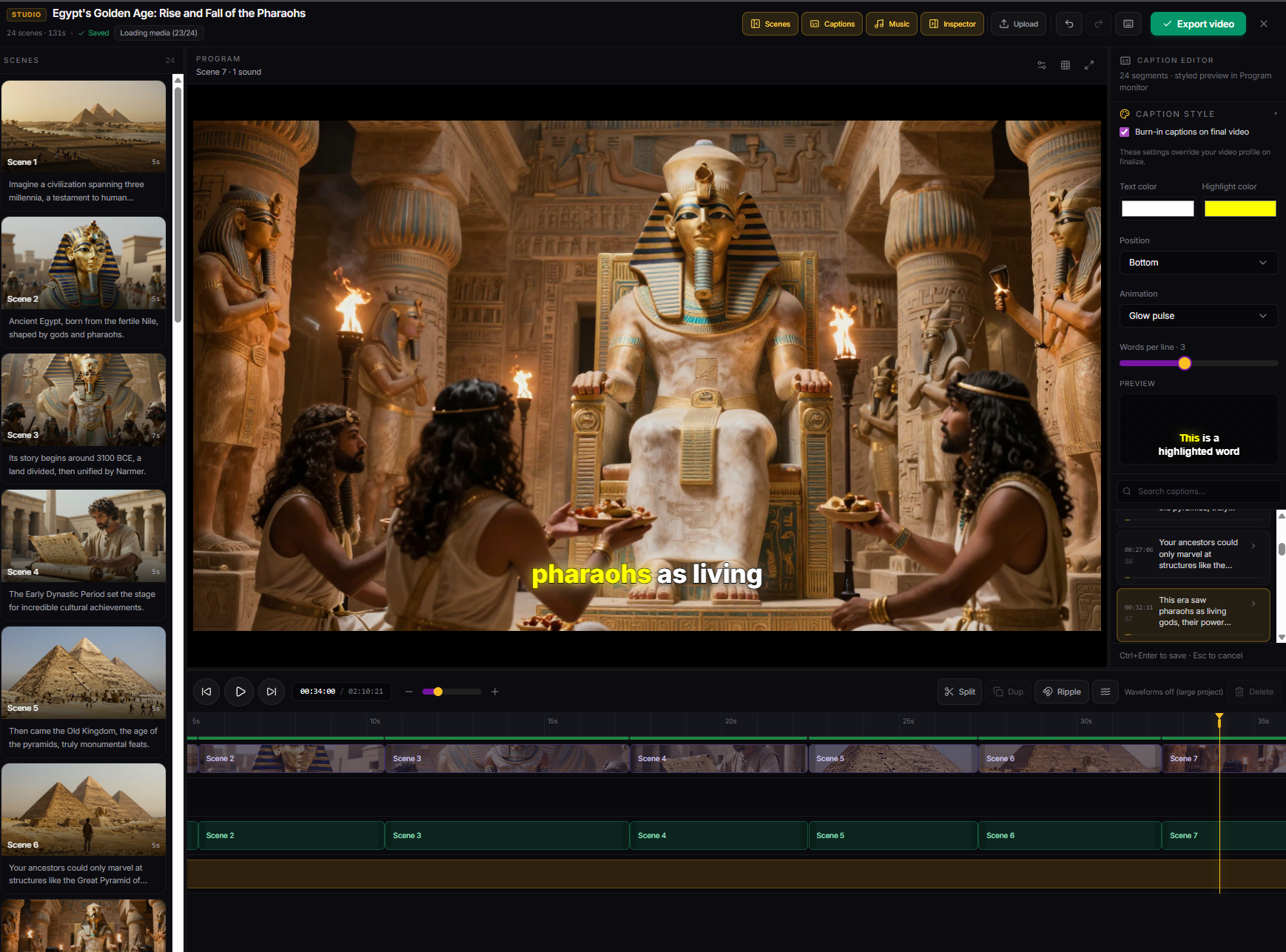
- Per-scene control Jump between scenes, edit voiceover lines, and tweak image prompts before export.
- Regenerate on demand Swap a still or clip without restarting the whole video (credits shown per regen).
- Profile default Enable in Video Profiles (on by default) or disable for one-shot generation.
Built for faceless YouTube operators
Review script, voice, visuals, and captions
Idea to YouTube in minutes, not hours
Replace a $2,000/mo editing team
Keep a weekly publishing rhythm
Manage channels from one place
Schedule after the workflow is dialed in
Built for faceless YouTube channels
Quick Create: polished preview + upload to YouTube when your channel is linked
7 languages — English, Spanish, Portuguese, Hindi, Japanese, Korean, Chinese
Same AI image quality in Quick Create and Studio Mode for long-form videos
See what you're getting
One dashboard for every channel, every agent, every video. Nothing else to install. Demo plays muted while you scroll — use the player controls to turn sound on.
app.autotube.org
New
Create videos in 7 languages
Pick your output language when you generate — script, voiceover, and captions are written for native speakers. English, Spanish, Portuguese, Hindi, Japanese, Korean, and Chinese. Shorts and long-form, same workflow. Unmute any clip below to hear the voiceover.
Try multi-language in the appShorts & vertical
Long-form & horizontal
Atmospheric overlays
Choose your overlay — or let AI pick
13 cinematic effects — glitch, heavy smoke, rain, fire, sparks, floating particles, and more. You're in full control: pick the mood that fits your content, preview it live before rendering, or leave it on Auto and AutoTube chooses for you. Disable it entirely with one toggle. All effects are tuned so your footage stays visible underneath.
Glitch
Scary · Tech · Conspiracy
Heavy Smoke
History · True Crime · Dark
Particles & Fire
Motivational · Fitness · Epic
Rain
Emotional · Love · Storytime
Sparks
Viral · Celebrity · News · History
Choose your overlay in Quick Create, Studio Mode, or your Video Profile — or set it to Auto and let AI decide. Try it free →
In the app
Avatar lip sync — see sample outputs
Pair a portrait with your script or voiceover and get a talking-head clip ready for Shorts or long-form. Free users can preview demo clips. Paid plans generate lip-sync videos with up to 1 minute of audio per job, billed as a flat credit charge (2.5 credits at 720p, 5 at 1080p). Learn more on the AI lip sync generator page. Clips autoplay muted as you scroll — unmute in the player to hear them.
Try it in the appSample output 1
Sample output 2
Sample output 3
You know the pain
Growing a faceless YouTube channel is hard enough. AutoTube shortens production while keeping the human review step that protects quality.
One narrated video takes hours
Scripting, voiceover, visuals, captions, rendering, and upload prep all add up. AutoTube turns that stack into one editable workflow.
Freelancers and tool stacks get expensive
If every video needs separate writers, voice tools, stock media, and editing, costs climb fast. AutoTube keeps the production stack in one place.
Quality still decides whether viewers return
AI can speed up production, but generic or mismatched scenes hurt trust. AutoTube gives you a review step before final export.
What features does AutoTube include?
AutoTube is a faceless YouTube production workflow: AI script, voiceover, captions, visuals, scene review, and optional upload scheduling in one browser dashboard. Build editable narrated videos first, then use AI clips, lip sync, and scheduled agents when they support the channel workflow.
Cut production time without skipping review
Generate an editable draft, inspect the scenes, and only render the final video when the structure works.
Keep a repeatable weekly workflow
Use profiles and scheduled agents once your format is working, instead of rebuilding the same setup from scratch.
Manage one to three channels with less chaos
Keep channels, profiles, drafts, and publishing tools in one dashboard before scaling further.
Editable scripts for narrated formats
Draft hooks, sections, and narration, then adjust weak or repetitive parts before the voiceover is final.
Voiceover and captions you can check
Generate narration and captions inside the workflow, then review pacing and readability before export.
Publish when the video is ready
Prepare title, description, tags, and upload from the same dashboard after you approve the output.
Quick Create for your next draft
Generate a video from a topic, preview it at a sensible size, then open the workflow that fits how much control the video needs.
Scene preview before you publish
Studio Mode pauses after scenes are built so you review voiceover and visuals on a full timeline, then approve one final render—or turn preview off in profiles for straight-through export.
See scene preview →Up to 30 minutes on Premium
Image-based long-form videos on Premium now run up to 30 minutes—ideal for deep dives and story-driven channels.
How do you build a faceless YouTube video with AutoTube?
Start with a topic or script, generate a narrated draft, review the weak spots, and export or publish when the video is ready. See the full faceless YouTube tutorial.
Topic UI Demo
Start with a topic or script
Bring your niche idea, outline, or full draft.
Script Demo
Generate the narrated draft
Script, voiceover, visuals, and captions come together.
Render Demo
Review every scene
Check narration, captions, and visuals before final render.
YouTube Demo
Export or publish
Send it out only when the video feels ready.
Why do YouTube creators switch to AutoTube?
These are the problems you told us about. AutoTube is built to solve them.
"One video eats my whole day"
Scripting, editing, rendering, and uploading a single video takes 8–12 hours. That's not scalable.
"I can't afford an editor"
Freelance editors charge $500–$2,000/mo per channel. Running 3+ channels? That's $6K/mo before you earn a dollar.
"I keep falling off schedule"
Miss a week and the algorithm buries you. Consistency is everything — but life gets in the way.
"I want production to feel repeatable"
Your channel needs a reliable process, not another pile of disconnected AI tools and editing chores.
Less than the cost of one freelance video
A single edited video costs $150–$500. AutoTube gives you 30–150 per month, starting free — 20% off your first month on any paid monthly plan (from $7.20 on Lite).
20% off first month applies to all paid monthly plans for eligible new accounts (Lite $7.20 · Starter $23.20 · Pro $47.20 · Premium $95.20).
20% off first month
Lite
$7.20
first month · then $9/mo
12 credits/mo · 1 channel · 5 min videos
View details 20% off first monthStarter
$23.20
first month · then $29/mo
30 videos/mo · 3 channels · ~$1/video
View details
Most popular
20% off first month
Pro
$47.20
first month · then $59/mo
90 videos/mo · 5 channels · ~$0.66/video
View details 20% off first monthPremium
$95.20
first month · then $119/mo
150 videos/mo · 10 channels · ~$0.79/video
View detailsYouTube automation solutions
AutoTube covers the full faceless video pipeline — pick the workflow that matches your channel format.
Quick Facts — AutoTube
- What is AutoTube?
- AutoTube is a web-based AI video creation platform for YouTube by Galaxy Labs LLC. It turns a topic or script into an editable narrated video with visuals and captions, then lets creators review scenes before exporting or publishing. Automation assists production; creators stay responsible for the final video.
- How much does AutoTube cost?
- AutoTube offers a free tier (no credit card required). Paid monthly plans: Lite $9/mo ($7.20 first month), Starter $29/mo ($23.20 first month), Pro $59/mo ($47.20 first month), Premium $119/mo ($95.20 first month). Eligible new accounts get 20% off the first month on monthly billing (any paid tier). Annual billing saves 17%.
- How many videos can AutoTube publish?
- AutoTube can publish up to 150 AI-generated YouTube videos per month on the Premium plan. The Pro plan supports 90 videos/mo; Starter supports 30 videos/mo. AI agents run on a user-defined schedule, 24/7.
- How many YouTube channels can I manage?
- AutoTube supports managing up to 10 YouTube channels simultaneously from a single dashboard on the Premium plan (Starter: 3 channels, Pro: 5 channels). Free tier: 1 channel.
- How does AutoTube save time?
- A single YouTube video typically requires 8–12 hours of scripting, recording, editing, rendering, and uploading. AutoTube's AI pipeline reduces this to minutes by handling every step automatically — writers report recovering 20+ hours per week by switching to AutoTube.
Source: autotube.org — Galaxy Labs LLC · Updated May 2026
Frequently asked questions about AutoTube
On the free tier you can run one agent; each scheduled run uses your credits. Paid plans support more agents and about 30, 90, or 150 agent-published videos per month depending on the plan, with no daily babysitting. You configure an agent once (profile + schedule). YouTube uploads use a connected channel; free includes one linked channel.
Quick Create is the fast path: describe your topic, pick duration and portrait or landscape, add music, and AutoTube generates the video. You can preview and upload to YouTube directly from the completion screen. Switch to Studio Mode anytime for the timeline editor, video profiles, caption styling, and full controls. More detail on the tutorial.
Free: image-based 30s–2 min. Lite: image-based up to 5 min, AI clips up to 2 min. Starter: image-based 30s–10 min, AI clips up to 5 min. Pro: image-based up to 15 min, AI clips up to 10 min. Premium: image-based up to 30 min, AI clips up to 15 min. All plans use the same AI scripts, voiceover, and caption pipeline.
AI clips is the in-app place to make short videos from a prompt (text to video) or a still image (image to video). Free accounts get one complimentary 5s / 720p clip; more AI clips require a paid plan. It is separate from your main long-form project videos. See pricing for more.
At 5s and 720p, each short AI clip costs 0.5 credit on paid plans. Maximum 5s/720p AI clips if you use every monthly credit only for those (and nothing else): Free — one complimentary clip (more AI clips require a paid plan; welcome credits are for other features); Lite (12 cr/mo) up to 24; Starter (40 cr/mo) up to 80; Pro (120 cr/mo) up to 240; Premium (300 cr/mo) up to 600. 10s / 720p = 1 credit; 1080p = 2× 720p for the same length. Long-form and other features will reduce how many clip runs you can afford. See pricing FAQ.
You see an estimate before each job runs. Image-based long-form videos use 1 credit per minute. AI-generated long-form video (scene-based) uses 5 credits per minute. AI clips (short text to video and image to video): one complimentary 5s / 720p run on the free plan; on paid plans, per-clip credits. See pricing for more.
Free tier: link 1 channel in Settings. Paid plans add more—Lite (1), Starter (3), Pro (5), Premium (up to 10). Connect with Google sign-in; we never store your Google password.
Yes. New accounts get 5 credits valid for 7 days and can create real videos. When the 7 days end or credits are used, the free trial ends. Free tier has limits: image-based videos 30s–2 min, long-form AI video clips locked to 30 seconds, 1 video profile, one linked YouTube channel via Google sign-in, 1 YouTube AI agent (scheduled runs use credits), and 1 AI video. The AI clips playground offers one complimentary 5s / 720p clip; more uses credits or a paid plan. Upgrade anytime for monthly credits, longer videos, more channel slots, more agents, and higher publishing volume.
Still have questions? Get in touch
Free guides & tools
Guides and tools for creators building repeatable faceless YouTube production workflows.
Popular guides
- ›Best faceless YouTube niches
- ›Make money on YouTube without showing your face
- ›How to create a faceless YouTube channel
- ›AutoTube vs manual editing for faceless channels
- ›25 AI YouTube channel ideas for faceless channels
- ›How to start a faceless YouTube channel
- ›What is YouTube automation?
- ›YouTube automation cost breakdown
- View all 33 guides →
Build your next faceless video with more control.
Start with free credits, generate an editable narrated draft, review every scene, and export or publish when it feels ready.