English
New Motion mode: AI images, brought to life →
AI video creation platform for YouTube
See examples
AI video creation platform for YouTube
Faceless YouTube videos, made and published on autopilot.
Type a topic. AutoTube writes the script, records the voiceover and builds AI visuals with motion graphics and captions. Upload the finished video to YouTube in one click, or let an AI agent create and post new videos on a schedule.
Shorts & long-form
7 languages
Auto-upload to YouTube
Free to start
New · Motion mode
AI images, brought to life
Most AI videos are a slideshow of still pictures. Motion adds the edit: every scene gets an AI illustration in one consistent style, then camera moves, animated charts, kinetic keywords, captions and sound effects timed to every cut.
An AI illustration for every scene
Each line of your script gets its own picture, drawn in the style you pick, from storybook to cinematic history.
Camera moves, not slideshows
Slow push-ins, pans and smooth transitions keep every scene moving, so viewers keep watching.
Your numbers, animated
Say “70 percent” or “8 out of 10” and Motion draws a live ring, icon grid, counter or trend chart with the exact number.
Sound effects on every cut
Whooshes, hits and ambience land on scene changes, mixed under your voiceover and music.
Made with Motion
Real videos from a one-line topic. Tap to watch with sound.
10 styles: Cinematic History · Storybook · Dark Mystery · Neon Countdown · Clean Explainer · Sunrise Motivation · Serene Geometric · Survival Choice · News Brief · Travel Postcard. Pick one, or let AutoTube match it to your topic.
| Mode | Best for | Credits / min |
|---|---|---|
| Motion Recommended | AI images with camera moves, animated charts and sound effects | 100 |
| AI Images | Simple narrated videos with a still AI image per scene | 100 |
| Blitz Paid plans | AI video for the hook and key moments, images for the rest | 250 |
| AI Videos Paid plans | An AI-generated video clip for every scene | 500 |
Make a Motion video free
Same price as AI Images: 100 credits per minute. Free credits included, no card required.
New · PhantasmBETA
Become anyone, in any video
Drop in a short motion clip and one image of your character. Phantasm makes your character perform every move: your mascot doing this week's trend, your cat in a leather jacket, dancing.
Made with Phantasm
Drop a motion clip
Any 2–10 second MP4: a dance, a walk, a reaction. One person and a steady camera work best.
Add your character
One photo or illustration. People, mascots, pets and cartoon characters all work.
Generate
Keep the trend sound or mute it, add a scene direction if you like, and download the MP4.
500 credits per video, any clip length · paid plans from $7.20 first month · charged only when your video is ready.
13 atmospheric overlays — you choose the effect, or let AI pick
Glitch
Dark Smoke
Fire
Particles
Sparks
30 min
Maximum image-based video length on Premium
150/mo
Maximum AI agent videos on Premium
10
YouTube channels on Premium
$0
Cost to start with the free tier
Studio Mode
Review every scene before you render
Scene preview pauses after your script, voiceover, and visuals are ready. Walk through each scene, edit narration, regenerate images or clips, then hit Apply & Generate Video when you are happy. Turn it off in Video Profiles for straight-through export.
Try scene preview
app.autotube.org — Studio Mode
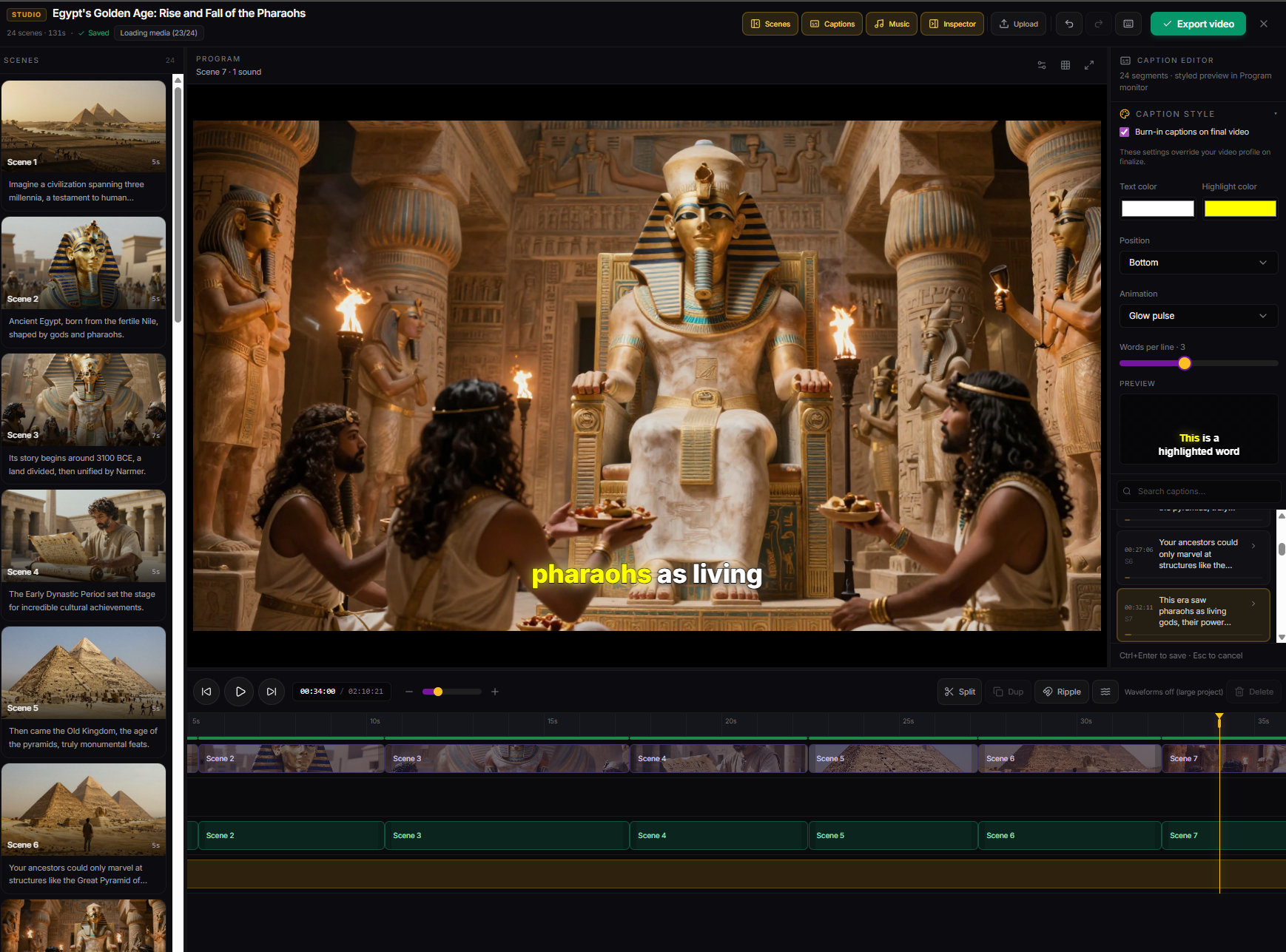
- Per-scene control Jump between scenes, edit voiceover lines, and tweak image prompts before export.
- Regenerate on demand Swap a still or clip without restarting the whole video (credits shown per regen).
- Profile default Enable in Video Profiles (on by default) or disable for one-shot generation.
AutoTube Content Planner: plan a month of niche video ideas
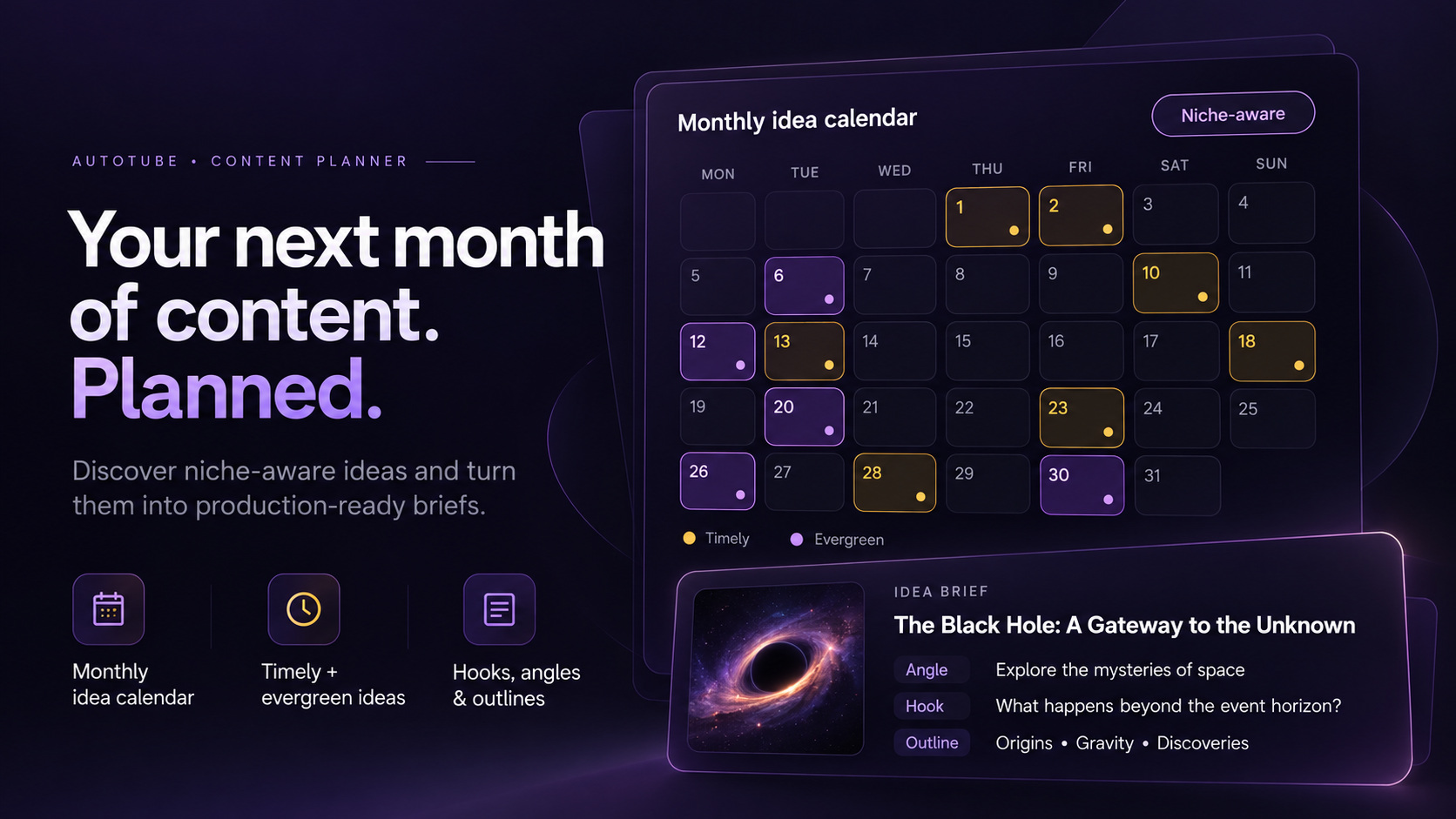
Research-backed ideas, shaped around your niche
Find timely topics from web research, fill the gaps with clearly labeled evergreen ideas, and turn a promising concept into a production-ready brief for your channel.
Research can surface timely ideas, but trend coverage is not guaranteed. Build allowances range from 1 calendar per month on Free while access is active to 15 on Premium. Scheduling videos straight from the Content Planner requires Starter or above, a connected channel, and enough generation credits.
Built for faceless YouTube operators
Review script, voice, visuals, and captions
From idea to finished video in one workflow
No editing software needed
Keep a weekly publishing rhythm
Manage channels from one place
Schedule after the workflow is dialed in
Built for faceless YouTube channels
Quick Create: polished preview + upload to YouTube when your channel is linked
7 languages — English, Spanish, Portuguese, Hindi, Japanese, Korean, Chinese
Same AI image quality in Quick Create and Studio Mode for long-form videos
See what you're getting
One dashboard for every channel, every agent, every video. Nothing else to install. Demo plays muted while you scroll — use the player controls to turn sound on.
app.autotube.org
New
Create videos in 7 languages
Pick your output language when you generate — script, voiceover, and captions are written for native speakers. English, Spanish, Portuguese, Hindi, Japanese, Korean, and Chinese. Shorts and long-form, same workflow. Unmute any clip below to hear the voiceover.
Try multi-language in the appShorts & vertical
Long-form & horizontal
Atmospheric overlays
Choose your overlay — or let AI pick
13 cinematic effects — glitch, heavy smoke, rain, fire, sparks, floating particles, and more. You're in full control: pick the mood that fits your content, preview it live before rendering, or leave it on Auto and AutoTube chooses for you. Disable it entirely with one toggle. All effects are tuned so your footage stays visible underneath.
Glitch
Scary · Tech · Conspiracy
Heavy Smoke
History · True Crime · Dark
Particles & Fire
Motivational · Fitness · Epic
Rain
Emotional · Love · Storytime
Sparks
Viral · Celebrity · News · History
Choose your overlay in Quick Create, Studio Mode, or your Video Profile — or set it to Auto and let AI decide. Try it free →
In the app
Avatar lip sync — see sample outputs
Pair a portrait with your script or voiceover and get a talking-head clip ready for Shorts or long-form. Free users can preview demo clips. Paid plans generate lip-sync videos with up to 1 minute of audio per job, billed as a flat credit charge (250 credits at 720p, 500 at 1080p). Learn more on the AI lip sync generator page. Clips autoplay muted as you scroll — unmute in the player to hear them.
Try it in the appSample output 1
Sample output 2
Sample output 3
You know the pain
Growing a faceless YouTube channel is hard enough. AutoTube shortens production while keeping the human review step that protects quality.
One narrated video takes hours
Scripting, voiceover, visuals, captions, rendering, and upload prep all add up. AutoTube turns that stack into one editable workflow.
Freelancers and tool stacks get expensive
If every video needs separate writers, voice tools, stock media, and editing, costs climb fast. AutoTube keeps the production stack in one place.
Quality still decides whether viewers return
AI can speed up production, but generic or mismatched scenes hurt trust. AutoTube gives you a review step before final export.
What features does AutoTube include?
AutoTube is a faceless YouTube production workflow: AI script, voiceover, captions, visuals, scene review, and optional upload scheduling in one browser dashboard. Build editable narrated videos first, then use AI clips, lip sync, and scheduled agents when they support the channel workflow.
Cut production time without skipping review
Generate an editable draft, inspect the scenes, and only render the final video when the structure works.
Keep a repeatable weekly workflow
Use profiles and scheduled agents once your format is working, instead of rebuilding the same setup from scratch.
Manage one to three channels with less chaos
Keep channels, profiles, drafts, and publishing tools in one dashboard before scaling further.
Editable scripts for narrated formats
Draft hooks, sections, and narration, then adjust weak or repetitive parts before the voiceover is final.
Voiceover and captions you can check
Generate narration and captions inside the workflow, then review pacing and readability before export.
Publish when the video is ready
Prepare title, description, tags, and upload from the same dashboard after you approve the output.
Quick Create for your next draft
Generate a video from a topic, preview it at a sensible size, then open the workflow that fits how much control the video needs.
Scene preview before you publish
Studio Mode pauses after scenes are built so you review voiceover and visuals on a full timeline, then approve one final render—or turn preview off in profiles for straight-through export.
See scene preview →Up to 30 minutes on Premium
Image-based long-form videos on Premium now run up to 30 minutes—ideal for deep dives and story-driven channels.
How do you build a faceless YouTube video with AutoTube?
Start with a topic or script, generate a narrated draft, review the weak spots, and export or publish when the video is ready. See the full faceless YouTube tutorial.
Topic UI Demo
Start with a topic or script
Bring your niche idea, outline, or full draft.
Script Demo
Generate the narrated draft
Script, voiceover, visuals, and captions come together.
Render Demo
Review every scene
Check narration, captions, and visuals before final render.
YouTube Demo
Export or publish
Send it out only when the video feels ready.
Why do YouTube creators switch to AutoTube?
Sound familiar? These are common problems for faceless creators, and AutoTube is built to solve them.
"One video eats my whole day"
Scripting, recording, editing, rendering and uploading a single video can take a whole day. That's hard to keep up.
"I can't afford an editor"
Paying writers, voice artists and editors for every video adds up fast, and the cost multiplies with every channel you run.
"I keep falling off schedule"
Miss a week and the algorithm buries you. Consistency is everything — but life gets in the way.
"I want production to feel repeatable"
Your channel needs a reliable process, not another pile of disconnected AI tools and editing chores.
Trusted by creators


“Seamless experience. Would 100% recommend to people making faceless youtube channels. …”
“Great for converting my ideas into videos with simple prompts without any hassle. …”
“Really good app. Makes accurate videos for my prompts!”
“Video quality is super nice specially the lip sync.”
Simple monthly plans, starting free
Starter includes about 30 videos a month and Premium about 150. Start free, then upgrade when you're ready — 20% off your first month on any paid monthly plan (from $7.20 on Lite).
20% off first month applies to all paid monthly plans for eligible new accounts (Lite $7.20 · Starter $23.20 · Pro $47.20 · Premium $95.20).
20% off first month
Lite
$7.20
first month · then $9/mo
1,200 credits/mo · 1 channel · 5 min videos
View details 20% off first monthStarter
$23.20
first month · then $29/mo
30 videos/mo · 3 channels · ~$1/video
View details
Most popular
20% off first month
Pro
$47.20
first month · then $59/mo
90 videos/mo · 5 channels · ~$0.66/video
View details 20% off first monthPremium
$95.20
first month · then $119/mo
150 videos/mo · 10 channels · ~$0.79/video
View detailsYouTube automation solutions
AutoTube covers the full faceless video pipeline — pick the workflow that matches your channel format.
Quick Facts — AutoTube
- What is AutoTube?
- AutoTube is a web-based AI video creation platform for YouTube by Galaxy Labs LLC. It turns a topic or script into an editable narrated video with visuals and captions, then lets creators review scenes before exporting or publishing. Automation assists production; creators stay responsible for the final video.
- How much does AutoTube cost?
- AutoTube offers a free tier (no credit card required). Paid monthly plans: Lite $9/mo ($7.20 first month), Starter $29/mo ($23.20 first month), Pro $59/mo ($47.20 first month), Premium $119/mo ($95.20 first month). Eligible new accounts get 20% off the first month on monthly billing (any paid tier). Annual billing saves 17%.
- How many videos can AutoTube publish?
- AutoTube can publish up to 150 AI-generated YouTube videos per month on the Premium plan. The Pro plan supports 90 videos/mo; Starter supports 30 videos/mo. AI agents run on a user-defined schedule, 24/7.
- How many YouTube channels can I manage?
- AutoTube supports managing up to 10 YouTube channels simultaneously from a single dashboard on the Premium plan (Starter: 3 channels, Pro: 5 channels). Free tier: 1 channel.
- What is AutoTube Motion mode?
- Motion mode adds motion graphics to AI-illustrated videos: camera moves, animated charts and counters, kinetic keywords, captions and sound effects, in 10 visual styles. It costs 100 credits per minute, the same as image-based videos. Other modes: AI Images (100 credits/min), Blitz (250 credits/min) and AI Videos (500 credits/min).
- How does AutoTube save time?
- Making a faceless video by hand means writing a script, recording a voiceover, finding visuals, editing, adding captions and uploading. AutoTube handles these steps in one workflow: enter a topic, review the draft, then export or publish.
Source: autotube.org — Galaxy Labs LLC · Updated October 2026
Frequently asked questions about AutoTube
YouTube AI Agents require a paid plan. Lite and Starter include 1 agent, Pro includes 3, and Premium includes 5. Each successful scheduled run uses credits and about 30, 90, or 150 agent-published videos per month depending on the plan, with no daily babysitting. You configure an agent once (profile + schedule). YouTube uploads use a connected channel; free includes one linked channel.
Quick Create is the fast path: describe your topic, pick duration and portrait or landscape, add music, and AutoTube generates the video. You can preview and upload to YouTube directly from the completion screen. Switch to Studio Mode anytime for the timeline editor, video profiles, caption styling, and full controls. More detail on the tutorial.
Free: image-based 30s–2 min. Lite: image-based up to 5 min, AI clips up to 2 min. Starter: image-based 30s–10 min, AI clips up to 5 min. Pro: image-based up to 15 min, AI clips up to 10 min. Premium: image-based up to 30 min, AI clips up to 15 min. All plans use the same AI scripts, voiceover, and caption pipeline.
AI clips is the in-app place to make short videos from a prompt (text to video) or a still image (image to video). Free accounts get one complimentary 5s / 720p clip; more AI clips require a paid plan. It is separate from your main long-form project videos. See pricing for more.
At 5s and 720p, each short AI clip costs 50 credits on paid plans. Maximum 5s/720p AI clips if you use every monthly credit only for those (and nothing else): Free — one complimentary clip (more AI clips require a paid plan; welcome credits are for other features); Lite (1,200 cr/mo) up to 24; Starter (4,000 cr/mo) up to 80; Pro (12,000 cr/mo) up to 240; Premium (30,000 cr/mo) up to 600. 10s / 720p = 100 credits; 1080p costs twice as many credits as 720p for the same length. Long-form and other features will reduce how many clip runs you can afford. See the pricing FAQ.
Motion turns each scene's AI illustration into an edited shot: camera moves, animated charts and counters for the numbers in your script, kinetic keywords, word-by-word captions and sound effects timed to scene changes. Choose from 10 styles (or let AutoTube pick one for your topic). It costs 100 credits per minute, the same as AI Images. See Motion.
You see an estimate before each job runs. Motion and image-based long-form videos use 100 credits per minute. Blitz uses 250 credits per minute. AI-generated long-form video (scene-based) uses 500 credits per minute. AI clips (short text to video and image to video): one complimentary 5s / 720p run on the free plan; on paid plans, per-clip credits. See pricing for more.
Free tier: link 1 channel in Settings. Paid plans add more—Lite (1), Starter (3), Pro (5), Premium (up to 10). Connect with Google sign-in; we never store your Google password.
Yes. New accounts get 500 credits valid for 7 days and can create real videos. When the 7 days end or credits are used, the free trial ends. Free tier has limits: AI Images and Motion videos from 30s to 2 min, 1 video profile, one linked YouTube channel via Google sign-in, and no YouTube AI agents. Blitz and AI Videos modes need a paid plan. The AI clips playground offers one complimentary 5s / 720p clip; more uses credits or a paid plan. Upgrade anytime for monthly credits, longer videos, more channel slots, more agents, and higher publishing volume.
Still have questions? Get in touch
Free guides & tools
Guides and tools for creators building repeatable faceless YouTube production workflows.
Popular guides
- ›Best faceless YouTube niches
- ›Make money on YouTube without showing your face
- ›How to create a faceless YouTube channel
- ›AutoTube vs manual editing for faceless channels
- ›25 AI YouTube channel ideas for faceless channels
- ›How to start a faceless YouTube channel
- ›What is YouTube automation?
- ›YouTube automation cost breakdown
- View all 41 guides →
Build your next faceless video with more control.
Start with free credits, generate an editable narrated draft, review every scene, and export or publish when it feels ready.